The Screenshot Is Not the Whole Story
Check a local news screenshot against the original post and its surrounding context so you can share the right link, preserve key limits, and avoid misleading neighbors.
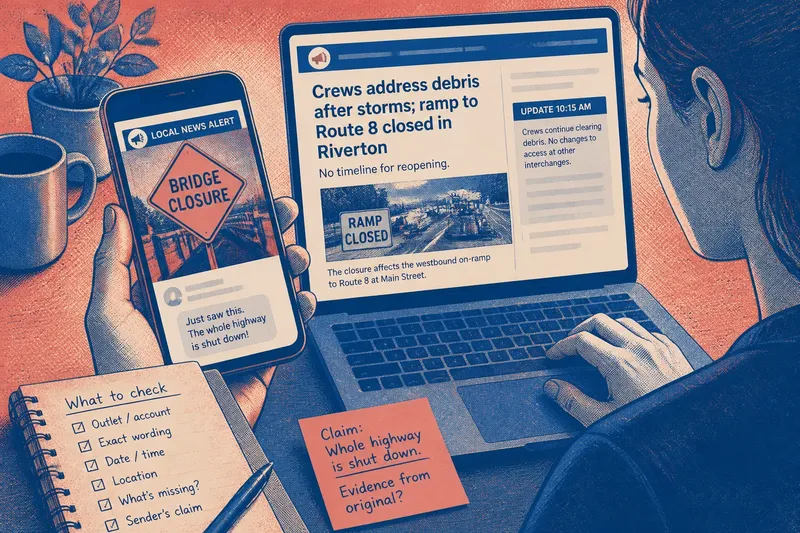
A neighbor shares a screenshot of a local news alert in a group chat. It shows a road sign and the words “bridge closure,” but no date or link. Before forwarding it, treat the crop as a clue, not the whole record. Checking a local news screenshot starts with identifying what the image actually captures and what the person sharing it has added.
A screenshot is like a page torn from a notebook: the words may be real, but nearby notes can change how you read them. Your task is not to settle every local dispute from one image. It is to recover the item’s context, distinguish the outlet’s material from commentary, and share only what the available source supports.
Identify the Screenshot
Before searching, note the details visible in the image. Keep observations separate from guesses, especially when text is blurry or partly cut off.
- Outlet or account: If the name or handle is legible, search that exact spelling; if it is cropped or unclear, search the visible wording and location instead.
- Distinctive wording: If a headline or sentence is readable, search a short exact phrase in quotation marks; if not, try the clearest place name and subject together.
- Date or time: If a timestamp is visible, record it as the post time unless the item says it is the event time; if there is no timestamp, do not infer when the event occurred.
- Location: If a town, road, or agency is named, use it to narrow the search; if no location appears, avoid attaching one based only on the photo.
- Crop boundaries: If the image cuts off a correction, caption, link, or qualification, note what is missing; if the edges are intact, continue checking because a complete-looking image can still be old.
- Added message: If the sender makes a claim beyond the visible text, write that claim separately; if the message merely links the item, check the link rather than treating the sender’s wording as part of the report.
Do not silently repair a blurred road number or town name from memory. A small reading error can point to a different place or an unrelated report.
Locate the Original
Search the outlet’s website for a distinctive phrase, then try the place name with a subject word if the first search fails. Check the outlet’s own social account as well. A screenshot may show a social post, a link preview, or a passage from an article, and those are not interchangeable.
Open a likely result instead of relying on the search preview. A preview can preserve old wording or omit qualifications. Match the result against more than one clue, such as the outlet name, a place, and a phrase. If several versions appear, keep the original post, article, and later update distinct rather than assuming they say the same thing.
If the original page is unavailable, look for a direct link from the outlet’s verified account or another page maintained by the outlet. A repost by a neighborhood group may help locate the source, but it does not establish that the repost is complete or current.
Read Beyond the Crop
Once you locate a likely match, read the full headline, subheading, relevant paragraphs, and any caption or update note. Check whether the screenshot shows reporting, an opinion piece, a live update, a reader comment, or promotional text. The outlet’s branding does not turn a reader comment into a newsroom statement.
For an image, inspect its caption and credit. A photo of a flooded road may illustrate an earlier event or a different location. If the screenshot omits the caption and you cannot recover it, describe only what is visibly shown; do not use the image alone to identify the time or place.
Look for corrections and changes on the page itself. If the article includes an update note, read what it says changed. A screenshot may preserve an earlier version, so do not treat a difference as evidence of wrongdoing unless you can establish what changed and when.
Separate Claim and Evidence
Write the claim being shared in one sentence. Then locate the passage that appears to support it. Ask whether the passage states the claim directly, attributes it to a source, describes a possibility, or leaves the point unresolved.
Attribution changes what a sentence establishes. “The county says the bridge will close” records the county’s announcement; it does not independently confirm that the closure has begun. Keep the named source attached when you summarize the report. Also preserve limits on place and time: a report about one entrance or a temporary restriction does not establish a closure across an entire route.
Say you receive a screenshot that reads “Route 8 closed,” while the accompanying message says the whole highway is shut. Imagine the original report identifies one blocked ramp in a named town and says crews are clearing debris. You check the article and its update, then share the direct link with the note that the report describes a ramp restriction, not a highway-wide closure. The resulting description keeps the location and scope intact without claiming more than the source says.
Choose What to Share
When you pass the item along, link to the original report or post and add a short note that preserves its source, location, timing, and any relevant uncertainty. Avoid circulating only the crop when a usable original link exists. That gives the next reader a way to see the surrounding material.
If you cannot locate the original or resolve a meaningful difference between the screenshot and the page, say what remains unclear. You can ask the sender for the link or share the outlet page while noting that the crop does not match it. Checking a local news screenshot is most useful when the original link travels with a careful description of what it does—and does not—say.
What Should You Check Next?
What if the original post is gone?
Search the outlet’s site and its own account using a distinctive phrase, place, or subject. If you find only unattributed copies, say you could not locate the original rather than presenting a copy as the outlet’s confirmed version.
Can a real screenshot still mislead?
Yes. A genuine crop can omit a date, caption, correction, or limiting detail, while the accompanying message may make a broader claim. Compare both the image and the sender’s wording with the original item.
What if the photo has no caption?
Look for the same image on the outlet’s page and check its credit and caption. If you cannot recover those details, describe only visible features and leave the location and date unstated.
What if the article differs from the screenshot?
Check for an update or correction note and confirm whether the image shows an article, preview, or social post. If the reason for the difference remains unclear, describe the discrepancy and link to the page you could access instead of declaring either version definitive.